
Google AI tools & services used to build this site.

Google Cloud Foundations

aka. Cloud Landing Zone

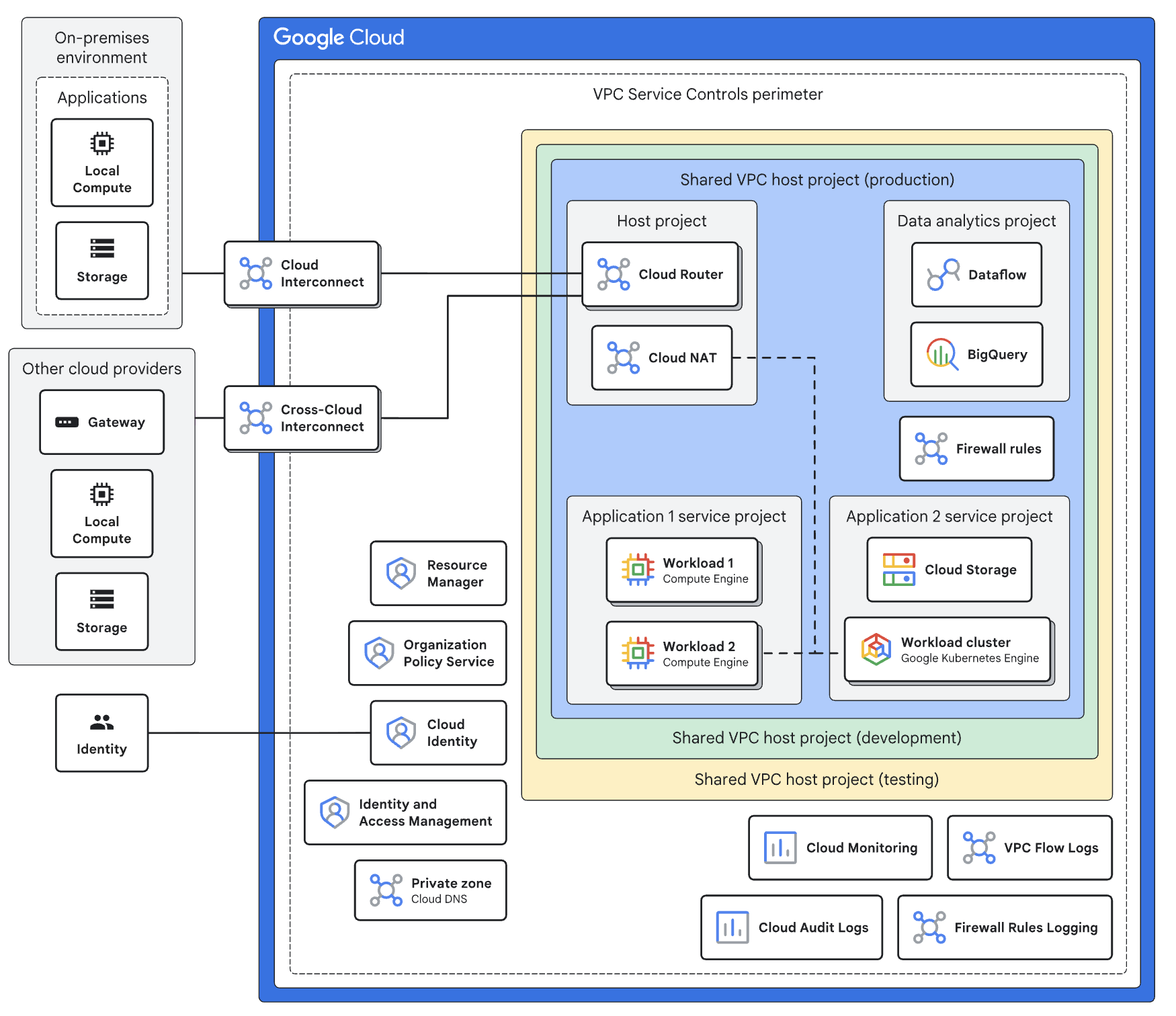
A Google Cloud Foundation (often called a Landing Zone) is the "digital plumbing" and structural blueprint of your cloud environment.

Before you move a single application or database, you need a secure, organized space to put them. Think of it like a modern office building: before the tenants (your apps) move in, you need the foundation poured, the electrical wiring (networking) safe, the security guards (IAM) at the door, and the utility meters (billing) set up.

The Problems it Solves

Without a formal foundation, cloud adoption often becomes a "Wild West" scenario. We solve the most common "Day 1" and "Day 2" headaches.
Screenshot 2026-04-07 at 5.37.30 pm


Shadow IT & Sprawl

Prevents teams from creating "untracked" projects that lead to security holes and surprise bills.

Security Gaps

Eliminates the risk of accidentally leaving data open to the public internet by enforcing "Guardrails" by default.

Networking Complexity

Fixes the chaos of disconnected networks that can't talk to each other or your on-premises data center.

Compliance Nightmares

Solves the struggle of proving "who did what" by centralizing audit logs and identity management.

Provisioning Delays

Removes the weeks of waiting for IT to set up a new environment; with a foundation, it takes minutes.

The Value it Adds

A solid foundation isn't just about safety—it's a competitive accelerator.
speed-alt-svgrepo-com

Speed to Market

Developers can spin up production-ready environments instantly through automated templates.

automate-svgrepo-com (1)

Operational Excellence

Centralized logging and monitoring mean you find and fix issues before your customers notice.

Cost Transparency

Cost Transparency

Automated billing exports and labels allow you to see exactly which department is spending what, down to the cent.

magnifier-glass-svgrepo-com

Governance at Scale

Enforce policies (like "data must stay in the US") across 10 or 1,000 projects simultaneously.
security-verified-svgrepo-com

Security by Design

Rather than "bolting on" security after an application is built, a foundation integrates it into the very core of the environment through Proactive Defence, Uniformity of Environments and a Reduced Blast Radius.
future-svgrepo-com

Future Proof Scalability

A foundation ensures that the architectural decisions you make today don't become the technical debt of tomorrow through Resource Consistency, Modular Growth and Standardised Tooling.

Activities We Perform

Our service follows a structured "Foundation Sprint" to get you from zero to cloud-ready.

Phase 1

Discovery & Landing Zone Design

Before technical deployment, you must align the cloud structure with the business's legal, financial, and technical requirements.

  • Define the Resource Hierarchy (Organization, Folders, and Project naming conventions).

  • Map business cost centers to Cloud Billing Accounts.

  • Identify data residency requirements to determine Regional Restrictions.

Phase 2

Identity & Access Management (Foundation)

Establish a "Single Source of Truth" for users and define the boundaries of who can do what by integrating existing identity providers and establishing the Principle of Least Privilege.

  • Sync Google Cloud Directory Sync (GCDS) or set up SSO/SAML with Azure AD or Okta.

  • Establish Super Admin and Organization Admin break-glass accounts.

  • Define Custom Roles and IAM groups to avoid assigning permissions to individuals.

Phase 3

Resource Hierarchy & Folder Structure

Create a scalable container system that allows for inherited policies and organized management.

  • Create a Common Folder for shared services (logging, networking, monitoring).

  • Establish Environment Folders (Prod, Non-Prod, Development).

  • Apply IAM bindings at the folder level to automate permission inheritance.

Phase 4

Networking & Connectivity (Shared VPC)

Centralize network management to ensure security while allowing application teams to move fast by designing a secure, scalable network architecture using Google’s "Shared VPC" best practices.

  • Provision a Host Project to manage centralized networking.

  • Configure Shared VPCs and subnets across regions.

  • Set up Cloud Interconnect or Cloud VPN for secure on-premises connectivity.

  • Establish Cloud DNS peering and private service access.

Phase 5

Secure Guardrails & Organization Policies

Implement proactive "fences" that prevent insecure configurations before they happen by enforcing corporate governance across the entire organization using Google’s Policy Service.

  • Enable Organization Policy Constraints (e.g., "Restrict Public IP access," "Limit Resource Usage to specific regions").

  • Configure VPC Service Controls (VPC-SC) to create a security perimeter around sensitive data.

  • Set up Cloud KMS (Key Management Service) for centralized encryption control.

Phase 6

Centralized Logging & Observibility

Ensure that every action in the cloud is recorded, searchable, and alerted upon by building a "Single Pane of Glass" for security and operational monitoring.

  • Create an Aggregated Log Sink to export all Audit Logs to a central Security Project.

  • Configure BigQuery or Pub/Sub as destinations for long-term log retention and SIEM integration.

  • Build baseline Cloud Monitoring Dashboards and Uptime Checks.


Phase 7

Billing & Cost Management

Establish financial transparency and prevent "bill shock" through automated reporting by sSetting up the tools required for FinOps and cost accountability.

  • Configure Billing Export to BigQuery for granular cost analysis.

  • Set up Budget Alerts at the Project and Folder levels.

  • Implement a Tagging/Labeling Policy to track spend by department or application.

Phase 8

Infrastructure as Code (IaC) Factory

Transition from manual "Point-and-Click" setup to a repeatable, version-controlled codebase by automating the Landing Zone deployment using industry-standard tools like Terraform.

  • Build a Terraform Seed Project with a Cloud Build pipeline.

  • Deploy Infrastructure-as-Code modules for Projects, VPCs, and IAM.

  • Store state files in a secure, encrypted Cloud Storage Bucket.

Phase 9

Environment Vending & Handover

Create a repeatable process for internal teams to "buy" new, compliant cloud environments by formalizing the transition from "Setup" to "Operations."

  • Develop a Project Vending Machine script to automate compliant project creation.

  • Conduct a Security Review and "Well-Architected" assessment.

  • Deliver Operational Runbooks and train the customer's IT team on the new foundation.


Schedule a Meeting

Reach out and connect with our team anytime.  The scheduling system will automatically determine our availability to connect with you and your team.

We can:

  • Do some Q&A in 30mins.
  • Get a rough order of magnitude in 45mins.
  • Discuss and understand your requirements in depth - 60mins.